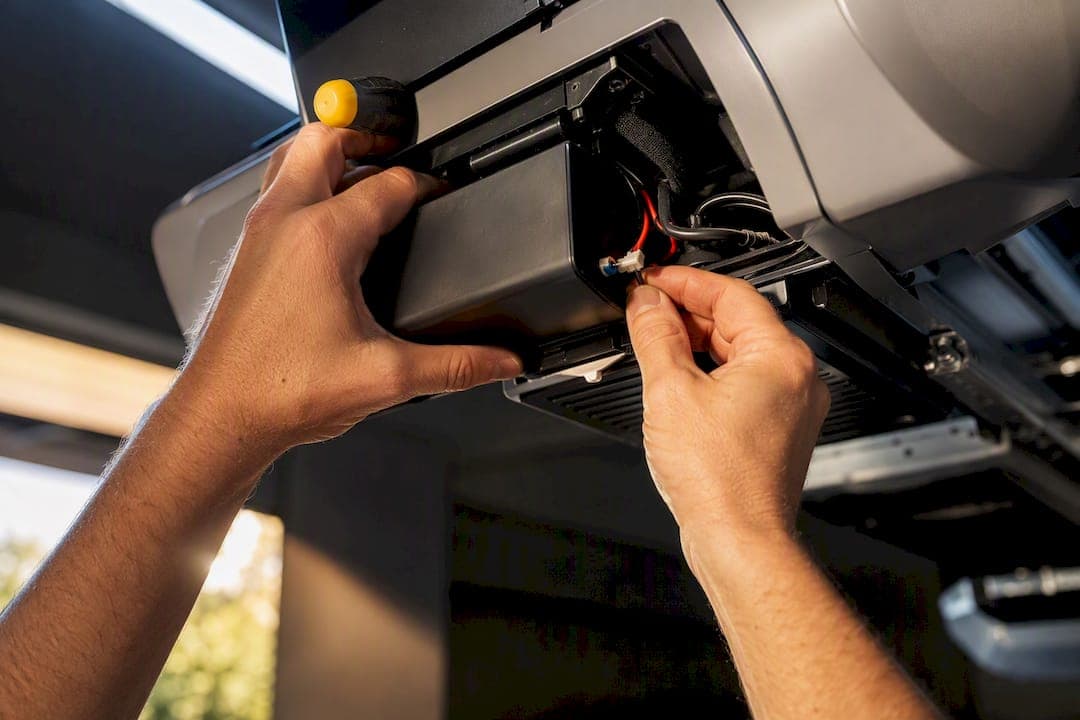
Yes, in most cases: if your opener has a battery bay or is listed as backup compatible, add one. If it doesn't, replacing the opener with a model that includes backup is usually smarter than retrofitting. Check your owner's manual or the motor housing for a battery compartment first, and if you're not sure what you're looking at, have a technician check it during a routine tune-up.
TL;DR:
- Adding a backup battery is most feasible on DC openers with a battery bay, while older AC chain-drive models generally require full replacement.
- Backup batteries are rated for only a few full open-close cycles, enough for emergencies or short outages, not extended power loss.
- Homeowners should perform quarterly tests and confirm compatibility before installing, especially on models over eight years old or with no battery compartment.
- Professional installation is recommended when compatibility doubts exist, when spring or door issues are present, or to preserve warranty coverage.
- Proper disposal involves recycling programs and avoiding household trash, with lithium batteries requiring extra caution due to fire risks.
Table of Contents
- What Does an Opener Battery Backup Actually Power?
- Can I Add Battery Backup to My Existing Opener?
- Add-On, New Opener, or Professional Install: How to Choose
- How Long Do Backup Batteries Last, and How Do You Test Them?
- What Does Installation Actually Cost and Take?
- Why a Local Technician Is Often the Smarter Call
- How Do You Dispose of Old Backup Batteries Safely?
- Installing an Add-On Battery Backup: What the Process Looks Like
- What Actually Matters When You're Deciding on a Backup
- Get Your Opener Battery Backup Installed Right the First Time
- Sources
- FAQ
What Does an Opener Battery Backup Actually Power?
An opener battery backup is either built into the motor unit or added on as a separate battery pack that wires into it. When the power cuts out, the system detects the loss and switches to battery power automatically, usually within a second or two, so you never have to flip a switch in the dark.
Here's what it actually runs: the motor, the safety reversal sensors, and the courtesy light. Wi-Fi connectivity and smartphone app features often go dark on battery power, since those draw more current than the opener's built-in electronics were designed to support during an outage.
Don't expect all-day, every-day service. LiftMaster's product guidance and independent installer testing both point to a similar reality: most backups are rated for a limited number of full open-close cycles on battery power, typically enough for emergency egress and a short outage, based on DoorServPro's field reporting. That's built for emergency egress and a day or two of inconvenience, not for riding out a week-long grid failure. Think of it as a spare tire for your garage door, not a permanent replacement wheel.
Can I Add Battery Backup to My Existing Opener?
Sometimes, and the answer depends almost entirely on your opener's age and drive type. Before you buy anything, run this quick check:
- Look at the motor housing for a battery compartment or bay, usually a small door or slide-out tray near the back.
- Pull up your model number and check it against the manufacturer's compatibility list, since Chamberlain's battery backup page maintains one of the more complete references.
- Note whether your opener runs on DC or AC power. Modern DC models, common since the mid-2010s, are far more likely to accept an add-on battery pack.
- Check your manual's specs page for the words "battery backup compatible" or a listed accessory part number.
Older AC-powered chain drives typically can't accept an add-on at all. Those motors weren't built with the transfer circuitry a backup needs, so trying to force a retrofit usually wastes money. If your opener is more than eight to ten years old and lacks a battery bay, replacing it with a backup-equipped model is almost always the better move, especially since California's SB-969 pushed manufacturers to build backup into far more of their standard lineups nationwide.
Add-On, New Opener, or Professional Install: How to Choose
Four factors should drive this decision: your opener's age, how often your area loses power, whether you still have active warranty coverage, and how much you rely on smart features.
- Under five years old with a battery bay? An add-on pack is usually the cheapest, fastest fix.
- Older AC unit or no battery bay? Budget for a new opener with backup built in rather than forcing a retrofit.
- Frequent storms or outages in your area? Prioritize backup now rather than waiting for the next one to catch you flat-footed.
- Opener still under manufacturer warranty? Confirm an add-on won't void it before you touch anything.
An add-on battery pack typically costs far less than replacing the whole unit, while a new opener with backup built in carries a higher sticker price but skips the compatibility guesswork entirely. Labor for either job is usually a small fraction of a full opener installation.
DIY works fine for a straightforward add-on pack on a compatible model. Hire a professional when you're unsure about compatibility, when spring tension or door balance is involved, or when a mistake could void your warranty.
Pro Tip: Ask any installer three questions before they start: which battery chemistry they're installing, what cycle rating it carries, and whether the work affects your existing opener warranty. A good technician answers all three without hesitation.
How Long Do Backup Batteries Last, and How Do You Test Them?
Backup batteries don't last forever, and chemistry drives most of the difference. Sealed lead-acid (SLA) batteries typically hold up for one to three years, while lithium packs often run three to five years, according to trade guidance on replacement intervals. Heat shortens both. A garage that bakes in summer sun will wear down a battery faster than a shaded or insulated one.
Testing is simple and takes under five minutes:
- Watch the status LED on the opener unit. A steady green light usually means the battery is charged and ready; blinking or amber often signals a fault.
- Listen for a chirp. Many units beep during a power event if the battery can't hold the load.
- Every three months, unplug the opener briefly and confirm the door still opens and closes on battery power alone.
- Check remote and keypad batteries at the same time. A dead keypad battery gets mistaken for an opener failure more often than you'd think.
A backup battery that fails a manual unplug test, refuses to hold charge overnight, or shows a solid red or amber LED for more than a few minutes needs replacing. Installer recommendations put a quarterly test on the calendar as the single habit that prevents most surprise failures.
What Does Installation Actually Cost and Take?
Costs split into three tiers depending on your starting point. An add-on battery pack for a compatible existing opener is the cheapest route, with modest parts and labor. A brand-new opener with backup built in costs more upfront but eliminates compatibility questions entirely. Professional installation labor for either job typically runs less than the price of the equipment itself.
- Add-on battery pack: lowest upfront cost, fastest install, only works on compatible DC models.
- New opener with integrated backup: higher sticker price, but no guesswork on fit and often a stronger warranty.
- Professional install (either path): adds labor cost but includes a full safety check most homeowners skip.
A technician doing this job right doesn't just plug in a battery. They check door balance, inspect spring tension, and test the safety reversal sensors, since a door that isn't traveling smoothly puts extra strain on the battery during every cycle. Most installs take under an hour once the technician is on site. Ask about maintenance plans if the upfront cost is the sticking point. Many local companies bundle battery checks into a broader tune-up rather than charging for it as a standalone visit.
Why a Local Technician Is Often the Smarter Call
Call a pro when you're unsure about compatibility, when the door itself feels heavy or unbalanced, when spring work is involved, or when you want to keep an existing warranty intact. A professional technician from Mr. Spring Garage Doors for garage door opener repair can ensure the job is done right. A battery backup only helps you if the rest of the door is working correctly, and a technician catches issues a homeowner often misses.
Mikes garage doors Loveland Colorado completes 90% of repairs the same day they're called in, so a battery backup question rarely turns into a multi-day wait. Many family-owned companies provide estimates upfront and over the phone, aiming to avoid surprise charges upon technician arrival. Veterans get a 10% discount, and repairs come backed by strong warranties.
Expect a real visit to include a full inspection, a model and compatibility check against manufacturer lists, and a written estimate before any work starts. If you want that inspection scheduled, the Loveland garage door services page is the place to start.
How Do You Dispose of Old Backup Batteries Safely?
Never toss a garage door backup battery in the household trash. Both sealed lead-acid and lithium batteries contain materials that are hazardous in a landfill, and most municipal waste programs specifically ban them from curbside pickup.
SLA batteries almost always qualify as universal waste, meaning most auto parts stores, hardware stores, and battery retailers will take them back for free through a recycling program. Look for a "battery recycling" bin near the entrance of stores that sell replacement automotive or SLA batteries, since the collection networks overlap.
Lithium packs need a bit more care. They should never be punctured, crushed, or exposed to high heat, since damaged lithium cells can spark or catch fire. Tape over the terminals with electrical tape before transporting one to a recycling drop-off point to prevent an accidental short.
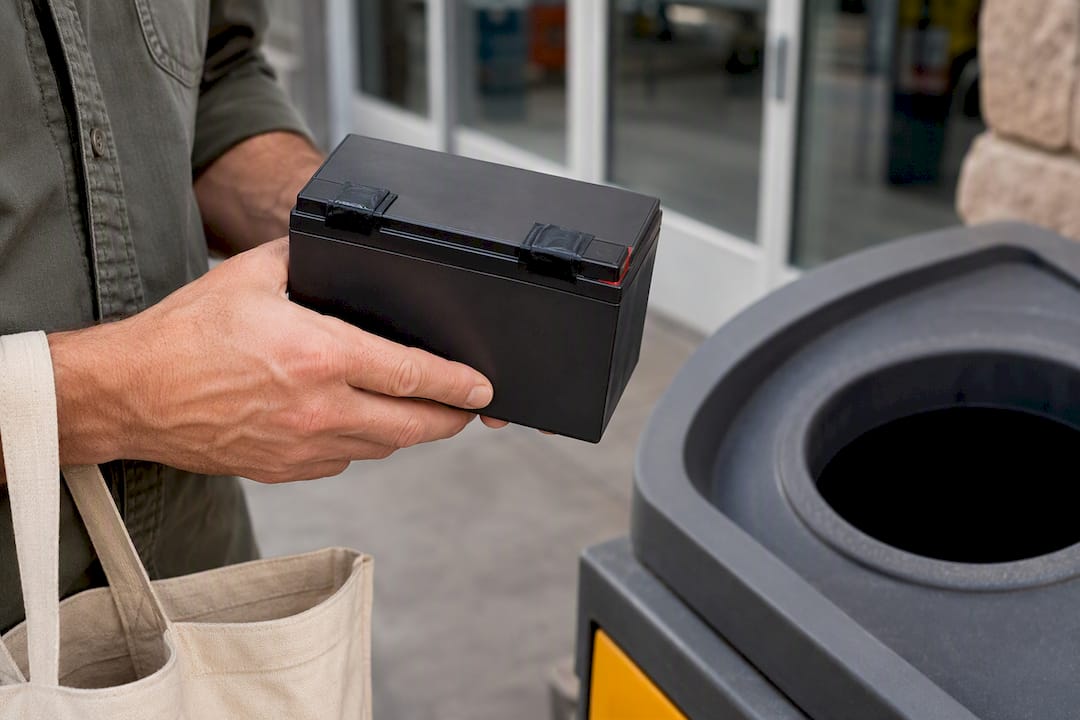
Many hardware chains and home improvement stores run battery take-back programs at no cost to you. Some manufacturers, including Genie, also sell replacement battery packs and note proper disposal guidance on the product page itself. If your local municipality runs a household hazardous waste collection day, that's another reliable option for either battery type. When in doubt, call ahead. A five-minute phone call beats guessing wrong on a battery that shouldn't go in a landfill.
Installing an Add-On Battery Backup: What the Process Looks Like
If your opener is confirmed compatible, the physical installation itself is fairly straightforward. Here's roughly how it goes.
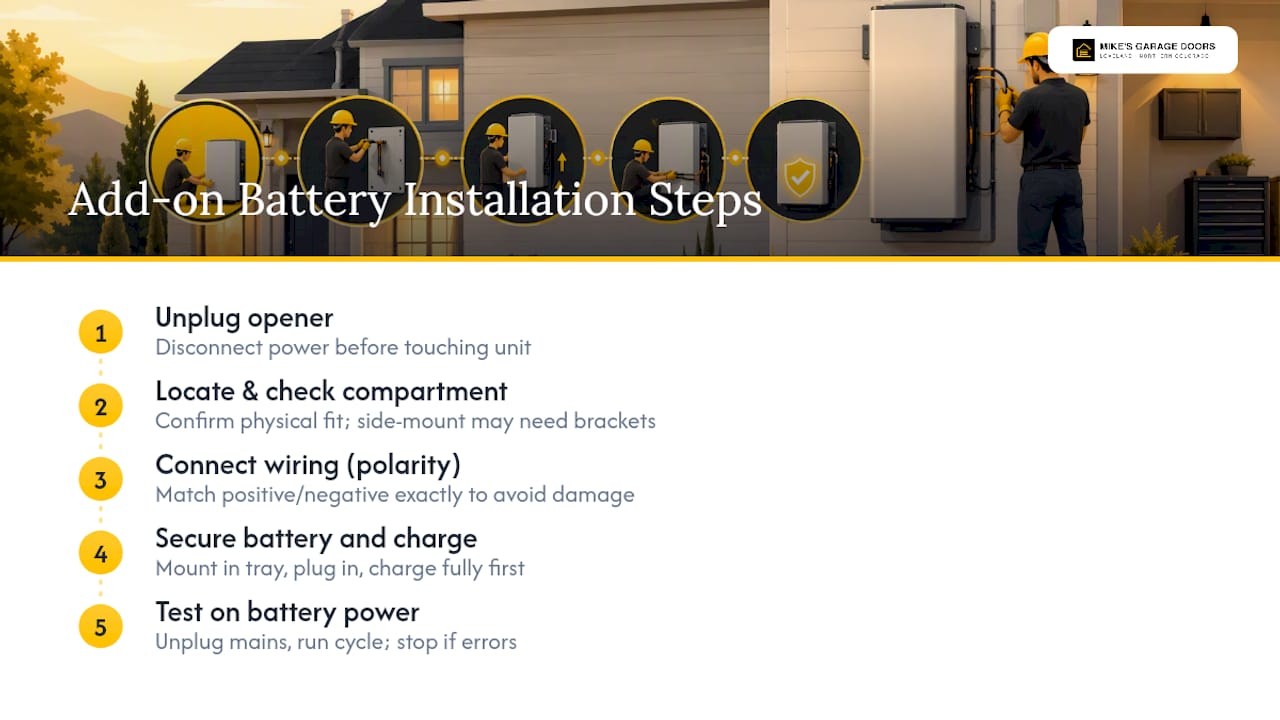
First, unplug the opener completely before touching anything. Battery backup systems carry stored charge even when the main unit is powered down, so working on a live connection risks a shock or a short.
Next, locate the battery compartment, usually a slide-out tray or hinged door on the back or side of the motor housing. Confirm the compartment matches the battery pack's physical dimensions before you buy, since manufacturers rarely make packs that fit across multiple product lines.
Connect the battery pack's wiring harness to the opener's designated backup port, following the polarity markings exactly. Reversing positive and negative connections can damage the circuit board immediately.
Secure the battery in its bracket or tray so it can't shift or vibrate loose during normal door operation. Plug the opener back in and let the battery charge fully before testing, which typically takes a few hours on first setup.
Finally, run a full test cycle: unplug the main power and confirm the door opens and closes smoothly on battery alone. If the door struggles, hesitates, or the LED flashes an error, stop and call a technician rather than forcing repeated cycles on a system that isn't behaving correctly. For openers mounted on specialty setups, a side-mounted installation may need extra bracket adjustments a standard center-mount kit doesn't require.
What Actually Matters When You're Deciding on a Backup
Most advice on this topic treats battery backup as a simple checkbox: buy one, plug it in, done. That's backwards. The battery is the last piece of a chain that includes spring tension, door balance, and sensor alignment, and a backup bolted onto a door that's already fighting itself will drain faster and fail sooner than anyone expects.
The compatibility check takes five minutes and should happen before any purchase, not after. Skipping it is how homeowners end up with a battery pack that doesn't fit, or worse, one that technically connects but strains a motor that was never rated for the added load.
Maintenance gets treated as optional, and that's the biggest gap between what the research supports and what people actually do. A quarterly unplug test costs nothing and catches a dying battery weeks before an actual outage does. If you only remember one thing from this article, remember that the backup you never test is the one that fails exactly when you need it.
— Eddie
Get Your Opener Battery Backup Installed Right the First Time
Buying a battery pack online is easy. Knowing whether it actually fits your opener, and whether your door's springs and balance can handle the added cycles, is where most DIY installs go sideways. Experienced local technicians can check compatibility, inspect door balance, and install battery backups in one visit, often providing transparent phone estimates without surprise charges upon arrival.
That matters most for homeowners in storm-prone parts of Northern Colorado, where a backup that hasn't been tested is worse than no backup at all, since it creates false confidence right when you need the door to work. Same-day service covers 90% of repair calls, and veterans receive a 10% discount on the visit. If you're weighing an add-on against a full opener replacement, a technician can settle that question on-site instead of leaving you guessing from a spec sheet. Request an inspection through the Loveland garage door services page and get a straight answer on what your opener actually needs.
Sources
- Battery Backup Openers | Chamberlain
- Battery Backup Garage Door Opener
- Garage door opener battery backup: what it does and whether you need one · Garage Door Science
- Battery backup garage door openers: worth it in storm country?
- Garage Door Opener Battery Backup Guide (2026) | Utah
FAQ
Can I Add a Battery Backup to My Existing Garage Door Opener?
Often yes, if your opener is a DC-powered model with a battery bay or listed compatibility, according to Chamberlain's compatibility guidance. Older AC chain-drive models usually can't accept an add-on and are better candidates for full replacement.
What Is the Best Battery Backup for a Garage Door Opener?
The best option is whichever backup your manufacturer lists as compatible with your specific model, since fit and voltage requirements vary by brand. Lithium packs generally outlast sealed lead-acid batteries and handle heat better, making them worth the extra cost in hotter garages.
Is Battery Backup Worth It on a Garage Door Opener?
Yes, especially if you live somewhere prone to storms or extended outages, since backup power gives you emergency egress without manually releasing the door. It's less critical if outages in your area are rare and brief.
How Long Will a Backup Battery Last on a Garage Door Opener?
Most backup batteries last two to five years, with sealed lead-acid models on the shorter end (one to three years) and lithium packs often reaching three to five years, per trade replacement guidance. Heat and frequent cycling shorten that window on either chemistry.