
Most of the time, a garage door remote not working comes down to one of a few common issues such as a dead battery, Lock mode being switched on, radio interference, or lost programming after a power blip. Your first move should always be the wall button. If it opens the door, the motor is fine and the problem lives in the remote or the opener's radio side. Pop in a fresh battery, walk up close to the opener, and test again before you touch anything else.
TL;DR:
- Most remote failures are caused by dead batteries, interference, or being in Lock mode, with the wall button typically still functioning properly.
- Testing proximity to the opener and checking for interference sources can help identify range issues, especially with LED bulbs or nearby electronics.
- Reprogramming a remote requires pressing the Learn button briefly, not holding it, to avoid erasing all stored remotes and needing to reprogram them all.
- Malfunctioning photo-eye sensors or wiring issues near the tracks can cause reversals or failure to close, not remote or receiver problems.
- When all remotes and keypad stop working simultaneously, the cause is usually Lock mode or a fault in the receiver or antenna, not dead batteries.
Table of Contents
- Why Is My Garage Door Remote Dead? Start Here
- How to Replace a Garage Door Remote Battery Safely
- Could Lock Mode Be Blocking Your Garage Door Remote?
- Is Interference Killing Your Garage Door Remote's Range?
- Are Your Photo-Eye Sensors Causing the Problem?
- How Do You Reprogram a Garage Door Remote?
- When Does the Opener's Receiver Need Attention?
- When Should You Call a Garage Door Technician?
- A Local Technician's Take on Remote Troubleshooting
- Get a Professional Fix for Your Garage Door Remote
- Where This Guide's Fixes Come From
- Sources
- FAQ
Why Is My Garage Door Remote Dead? Start Here
Before you replace parts or call anyone, run these checks in order. Each one takes a minute or two, and together they tell you whether you're dealing with a battery problem, a settings problem, or something mechanical.
Safety first. Never force the door by hand if it won't move, and keep hands, kids, and pets clear of the track while testing. If the door is jammed or off its rails, stop and read our manual lift test guide before doing anything else.
- Press the wall-mounted button. This is the single most useful diagnostic step you have. If the door opens from the wall but not the remote, the motor and drive system are working fine — the fault is on the radio side.
- Swap in a fresh battery. Not one from the junk drawer that's been sitting for two years. Use a new, sealed cell and test again.
- Walk right up to the opener and try the remote from a few feet away. If it works up close but not from your driveway, that's a range problem, not a dead remote.
- Grab a second remote or the keypad, if you have one. If it works and your original doesn't, the issue is isolated to that one clicker.
- Check the wall panel for a blinking light. That's often the tell for Lock (vacation) mode, which we'll cover next.
Garage clicker not working after you've done all five? You're narrowing in on either an interference problem or a receiver-side issue on the opener itself, both covered further down. If multiple remotes and the keypad all fail at once, that's rarely a coincidence. It usually points to Lock mode or a receiver fault rather than four dead batteries at the same time.
How to Replace a Garage Door Remote Battery Safely
Most remotes run on a coin cell or similar battery, depending on the model, so check your remote for the correct battery type. Check the back panel or the sticker inside the battery door if you're not sure which one yours takes.
Open the case carefully. Most snap open with a small tab or screw on the back. Once it's open:
- Note the polarity before you pull the old battery out. A battery installed backward won't damage anything, but it also won't work.
- Look at the contacts for a dull green or white crust. That's corrosion, and it blocks the connection even with a brand-new battery.
- Wipe corroded contacts with a dry cloth or a pencil eraser, then reseat the battery firmly.
- Buy batteries from a sealed multi-pack rather than a spinner rack near the register. Loose blister packs sit on shelves for years and can arrive half-drained.
A weak battery has a signature symptom: the remote works only when you're standing a few feet from the opener, then goes silent from the driveway. That's your fresh-battery clue, not a range or interference clue.
If a brand-new battery with clean contacts still produces nothing, no clicking sound, no light on the remote, the internal circuit board has likely failed. At that point, replacing the remote is cheaper and faster than trying to repair it.
Pro Tip: Keep a spare battery of the right size in your junk drawer labeled specifically for the garage remote. It sounds small, but it saves a ten-minute round trip to the store the next time this happens.
Could Lock Mode Be Blocking Your Garage Door Remote?
Lock mode, sometimes called vacation mode, disables every wireless remote and keypad while leaving the wall-mounted button fully functional. Manufacturers built it this way on purpose, so you can still get in and out through the wall switch while you're away and every remote is deliberately shut off.
This explains a specific pattern: the wall button works, but nothing wireless does, even with fresh batteries. Here's what to check:
- Look at the wall control panel for a blinking LED or lit lock icon.
- Press and hold the Lock button for about two seconds. The LED should turn off, and your remotes should work again immediately.
- If you have a smart garage control app, check the settings menu. Some newer panels bury this toggle inside an app screen instead of on the physical panel.
- If the light won't clear, unplug the opener for 30 seconds, plug it back in, and try again.
- Check every wall panel in the house if you have more than one. It's common to fix the garage panel and forget the one by the back door.
Is Interference Killing Your Garage Door Remote's Range?
Here's the one homeowners almost never suspect: the light bulb in your garage door opener. Cheap LED bulbs, especially the bargain multi-packs, can emit radio-frequency noise on the same 315 or 390 MHz bands most remotes use to talk to the opener. So can nearby baby monitors, mesh Wi-Fi extenders, and some LED shop lights in the garage.
Run this test: turn off the opener's built-in light and any nearby LED fixtures, then try the remote again from your usual distance. If it suddenly reaches farther, you've found your culprit.
A few other spots worth checking:
- The opener's antenna, that thin wire hanging from the motor unit, should hang straight down, not coiled up or tucked behind the housing.
- Wi-Fi routers or mesh nodes mounted near the garage ceiling can crowd the same frequency space. Try relocating one temporarily as a test.
- Fluorescent tube fixtures and dimmer switches are known interference sources in older garages.
- If a cheap LED bulb is the problem, swap it for an opener-rated LED bulb, specifically labeled as vibration and RF-safe for garage door use.
Pro Tip: If your remote only fails during certain hours or seasons, think about what's running nearby. A neighbor's new holiday lights or a seasonal space heater can introduce interference that wasn't there a month ago.
Are Your Photo-Eye Sensors Causing the Problem?
If your remote opens the door but won't close it, or the door starts down and reverses, the issue usually isn't the remote at all. It's the photo-eye sensors, the two small units facing each other near the bottom of the tracks.
- Look at the sensor lights. Most pairs show a solid light on both units when aligned correctly. A blinking or dark light on either side means misalignment or an obstruction.
- Clean both lenses. Dust, cobwebs, and lawn debris on the lens face are enough to block the beam. Wipe them with a soft, dry cloth.
- Check alignment gently. The sensors mount on brackets that can get bumped by a bike, a lawn mower, or a stray basketball. Loosen the wing nut slightly and nudge the sensor until the light goes solid, then retighten.
- Run the hold-to-close test. Press and hold the wall button while watching the door close. If it closes fully while held but won't close on a single remote press, that confirms a sensor issue rather than a remote problem.
If the wiring running to either sensor looks chewed, frayed, or disconnected, that's an electrical repair, not a cleaning job. Don't tape or splice sensor wiring yourself. Faulty sensor wiring is a safety issue, since these sensors exist to stop the door on an obstruction, and a technician should handle the fix.
How Do You Reprogram a Garage Door Remote?
Reprogramming your garage door remote follows roughly the same pattern across most brands, though exact button placement varies by manufacturer.
- Find the Learn button on the opener motor unit, usually near the antenna wire, often small and colored.
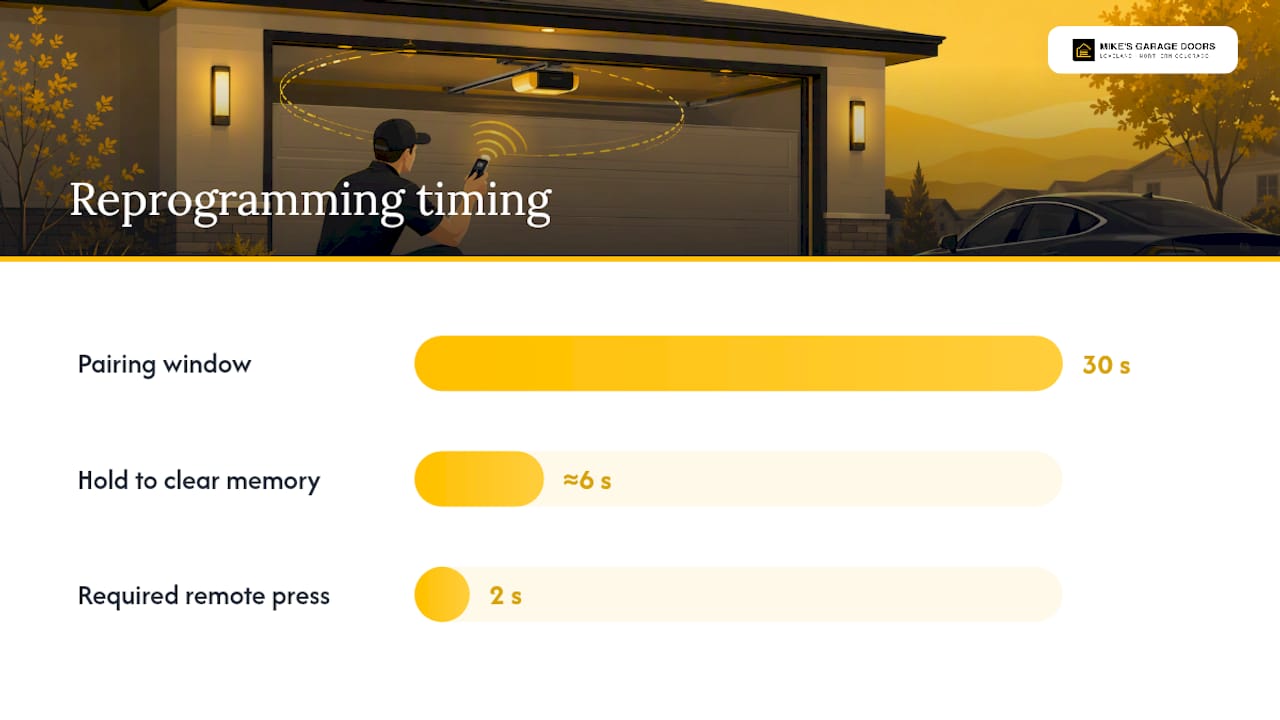
- Press and release it once. This opens a short pairing window, typically 30 seconds, during which the opener will accept a new remote.
- Within that window, press the button on your remote you want to pair, then release. A click or a light flash on the motor unit confirms the pairing.
- Test the remote right away before closing up the housing.
Here's the mistake that trips up most people: holding the Learn button down for several seconds instead of a quick press. Holding it for about six seconds clears the opener's entire memory, wiping out every remote and keypad you've ever paired, not just the one giving you trouble. If that happens, you'll need to reprogram every remote and keypad in the house from scratch.
If your pairing attempt keeps failing, check your opener's manual for the exact button sequence. Some models require holding the remote button for a full two seconds rather than a quick tap, and getting the timing wrong is the most common reason reprogramming doesn't take.
When Does the Opener's Receiver Need Attention?
Watch the opener's indicator light when you press a remote from across the garage. A quick blink means the receiver picked up the signal, even if the door doesn't move, which tells you the fault is downstream of the radio.
- No blink at all, from any remote, suggests a receiver or antenna problem rather than a battery issue.
- Check that the antenna wire hangs freely below the motor housing. A coiled, kinked, or torn antenna cuts range dramatically.
- If every remote and keypad stopped working at the exact same time, suspect Lock mode first, then a receiver fault, rather than four batteries dying together.
- A replacement logic board typically costs less than a full opener swap, but a technician needs to confirm that diagnosis before you spend money on parts.
When Should You Call a Garage Door Technician?
Some symptoms are worth handling yourself. Others aren't. Call a professional if you notice:
- The wall button itself stops responding, not just the remote.
- Visible frayed wiring, a burning smell, or smoke near the opener unit.
- A broken spring or snapped cable. These carry serious tension and are not a DIY repair under any circumstance.
- A receiver or logic board that seems to have failed internally.
Before you call, jot down your opener's brand and model number, which sits on a sticker on the motor housing, along with exactly what you've already tried and whether the wall button still works. That short list saves real time on the visit. Most straightforward issues like this get resolved same-day once a technician is on-site, since the diagnostic steps above already rule out most of the guesswork.
A Local Technician's Take on Remote Troubleshooting
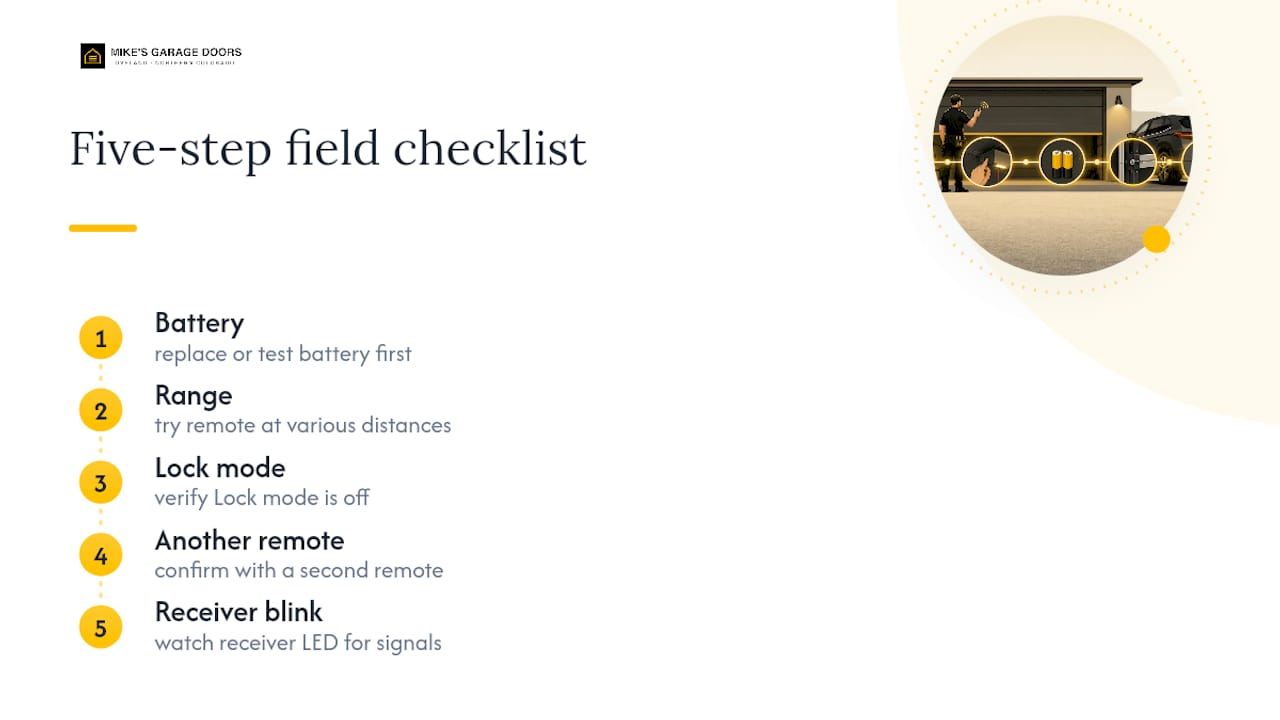
Homeowners chase the wrong fix more often than you'd think. They'll reprogram a remote three times before ever checking if Lock mode is on, or replace a perfectly good remote when a $10 LED bulb was jamming the signal the whole time. The wall-button test and a five-step field checklist, battery, range, Lock mode, another remote, receiver blink, catch the overwhelming majority of cases before a technician ever needs to show up.
That's the same order Mike's Garage Door Repair techs work through on service calls across Loveland, where 90% of repairs close out same-day. Family-owned shops tend to explain the "why" rather than just swap parts, and that's worth demanding from whoever you call. Veterans get a 10% discount here, for what it's worth. But the moment wiring looks damaged or a spring is involved, stop. That's not a remote problem anymore, and it's not a DIY afternoon either.
— Eddie
Get a Professional Fix for Your Garage Door Remote
If you've run through the battery swap, the Lock mode check, and the interference test and your remote still won't cooperate, the smarter move is a same-day visit instead of a fourth trip to the hardware store. A local garage door repair service handles remote reprogramming, receiver and logic-board repair, and sensor wiring fixes, offering upfront phone estimates so you know the cost before anyone touches your door.

Have your opener's brand and model number ready, plus a quick note on what you've already tried, and a technician can usually diagnose the issue over the phone before ever arriving. Most jobs like this wrap up the same day they're scheduled, and veterans get 10% off the repair. Check out the full range of garage door services in Loveland to book a visit or get a phone estimate started.
Where This Guide's Fixes Come From
The troubleshooting steps above draw on manufacturer support documentation and field-tested technician priorities, not guesswork.
- Chamberlain Group: why the wall button works but the remote doesn't
- CRAFTSMAN support: Lock mode and wall button troubleshooting
- Raynor: garage door remote programming steps
- Garage Door Science: diagnosing a dead remote
For general upkeep beyond troubleshooting, the garage door maintenance guide from Mad L Ladder covers inspection habits worth building into your yearly routine.
Sources
- Your garage door remote stopped working. Here's how to figure out why. · Garage Door Science
- Garage Remote Not Working but Wall Button Works? — DailyGenius
- Garage door remote troubleshooting — Raynor
FAQ
How Do You Reset a Garage Door Opener Remote?
Press and release the Learn button on the opener motor unit once, then press the remote's button within the 30-second pairing window that follows. Holding the Learn button for about six seconds instead clears all stored remotes, so use a quick press only.
How Do I Get My Garage Door Remote to Work Again?
Start with the wall button to confirm the motor works, then replace the remote's battery with a fresh sealed cell and test from close range. If that doesn't fix it, check for Lock mode, try a second remote, and rule out interference from LED bulbs or nearby electronics before reprogramming.
Do Garage Door Opener Remotes Go Bad?
Yes. The battery is the most common failure point, but the internal circuit board can also die outright, usually showing no light or click even with a fresh battery installed. At that point, a replacement remote is the practical fix.
Why Isn't My Garage Door Wall Button Working, but the Remote and Keypad Do?
This points to a wiring or wall-panel fault rather than a radio-side problem, since the wall button runs on a physical wired connection separate from the wireless receiver. A trained technician should inspect the wiring, since this pattern is less common and often involves a damaged connection rather than a simple settings fix.
Why Do All My Remotes and the Keypad Stop Working at Once?
Simultaneous failure across every wireless control almost never means every battery died together. Check Lock mode first, then suspect a receiver or antenna fault on the opener itself if Lock mode is already off.